The Canvas of Creativity and Consumption: A Deep Dive into the iPad Air 4’s Liquid Retina Display
In the vast ecosystem of tablets, the display is arguably the most critical component. It is the window to our digital world, the canvas for our creativity, and the portal for our consumption. When Apple unveiled the iPad Air 4 in 2020, it marked a significant design overhaul, bringing it closer to its Pro siblings. Central to this transformation was its stunning Liquid Retina display. While it might not boast every bleeding-edge feature found in the most premium tablets, the iPad Air 4’s screen offers an exceptional balance of resolution, color accuracy, brightness, and overall quality that positions it as a powerhouse for a broad range of users.
This article will embark on an extensive exploration of the iPad Air 4’s display, dissecting its technical specifications, examining its real-world performance, and contextualizing its place within Apple’s diverse tablet lineup.
I. Understanding the Foundation: The Liquid Retina Display Philosophy
Apple’s "Liquid Retina" branding, first introduced with the iPhone XR and later adopted by the iPad Pro lineup, signifies an advanced LCD (Liquid Crystal Display) technology. It’s a testament to Apple’s relentless pursuit of optimizing LCD panels to deliver experiences that rival, and in some aspects surpass, traditional display technologies. For the iPad Air 4, this translates into a truly immersive and vibrant visual experience.
At its core, the iPad Air 4 features a 10.9-inch IPS LCD panel. IPS (In-Plane Switching) is a superior variant of LCD technology, renowned for its excellent viewing angles and consistent color reproduction, even when viewed from oblique perspectives. Unlike older, cheaper LCDs that suffer from color shift and contrast degradation when not viewed head-on, IPS ensures that content remains true to life whether you’re sharing the screen with a friend or using it in an unconventional position.
One of the most significant upgrades that the iPad Air 4 inherited from the iPad Pro lineup is the fully laminated display. This means there is virtually no air gap between the display panel and the cover glass. The benefits of this lamination are multifaceted:
- Reduced Parallax: For artists and note-takers using the Apple Pencil, the elimination of the air gap drastically reduces the perceived distance between the pen tip and the "ink" on the screen. This creates a much more natural and precise drawing or writing experience, akin to putting pen to paper.
- Improved Visuals: By bringing the pixels closer to the surface, images and text appear to "float" on the screen, creating a more direct and engaging visual interaction. It enhances the feeling of immediacy and responsiveness.
- Enhanced Durability: While not explicitly a display quality feature, the lamination can contribute to the structural integrity of the display assembly, making it feel more solid and less prone to flex.
Beyond the lamination, the iPad Air 4’s display is also equipped with an anti-reflective coating. This microscopic layer significantly reduces glare and reflections from ambient light sources, making the tablet more usable in bright environments such as outdoors or under strong indoor lighting. While no display is entirely immune to reflections, this coating drastically mitigates the issue, ensuring content remains visible and colors remain accurate even in challenging lighting conditions.
Finally, a fingerprint-resistant oleophobic coating adorns the display. This is a practical, everyday feature that helps repel oils from your fingers, reducing smudges and making the screen easier to clean. It ensures that the pristine visual quality isn’t constantly marred by distracting fingerprints.
II. Resolution and Sharpness: The "Retina" Experience
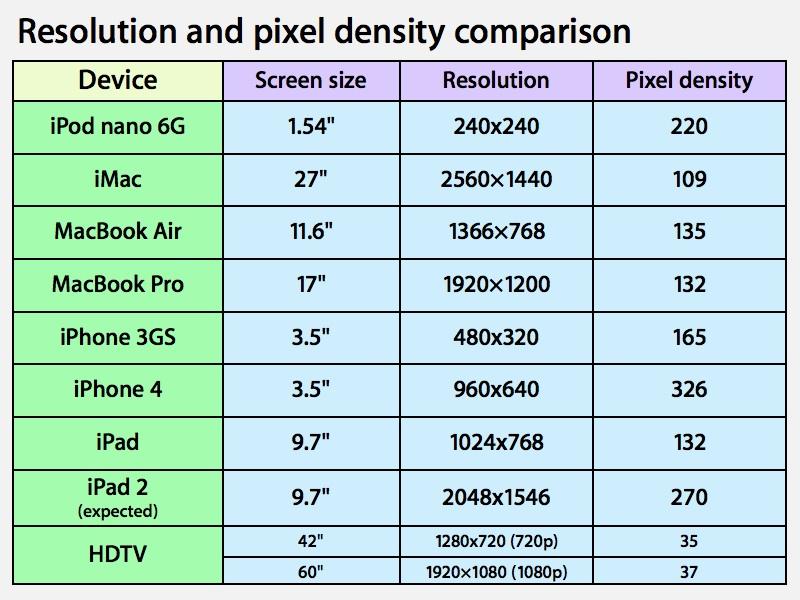
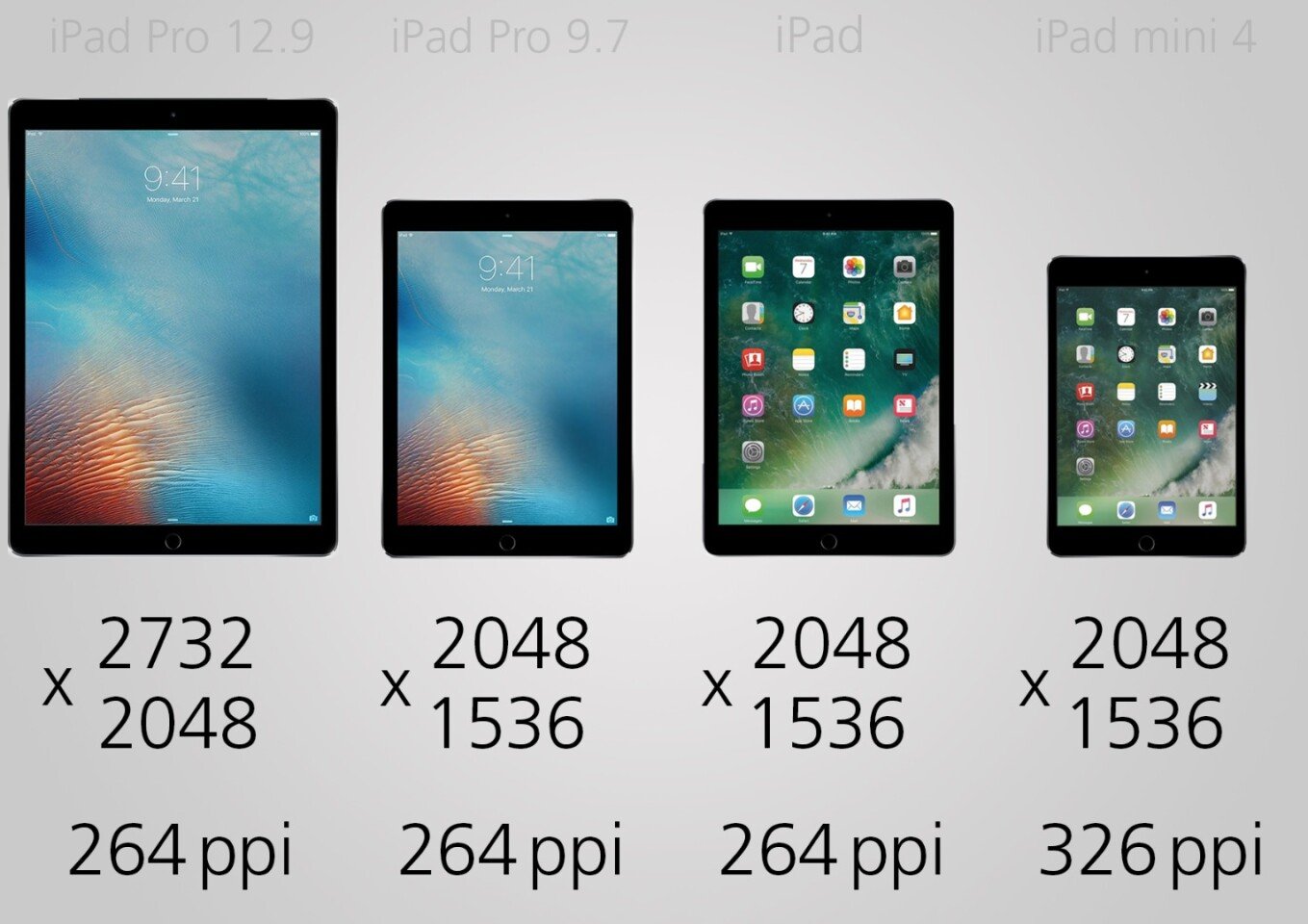
The iPad Air 4 boasts a resolution of 2360 x 1640 pixels. While these numbers might seem abstract on their own, their true significance lies in the resulting pixel density. With its 10.9-inch screen size, this resolution translates to approximately 264 pixels per inch (ppi).
This 264 ppi figure is precisely what Apple defines as "Retina" for its iPads. The "Retina" concept posits that at a typical viewing distance, individual pixels become indistinguishable to the human eye. What you perceive is a smooth, continuous image, much like a printed photograph.
What does 264 ppi mean for the user?
- Crisp Text: Reading on the iPad Air 4 is a pleasure. Text appears incredibly sharp and well-defined, without any visible pixelation or jagged edges. Whether you’re reading an e-book, browsing a webpage, or typing out an email, the clarity of the text minimizes eye strain and enhances readability.
- Detailed Images and Videos: Photos and videos are rendered with impressive detail. Fine textures, intricate patterns, and subtle nuances in images are clearly visible. High-resolution video content, especially 4K streams, looks stunning, with every frame benefiting from the high pixel count.
- Precision for Creative Work: For tasks like photo editing, graphic design, or illustration, the high pixel density ensures that you can see minute details and make precise adjustments. Lines drawn with the Apple Pencil are smooth and free of stair-stepping, providing a professional-grade experience.
- Immersive Gaming: Games with detailed graphics truly shine on this display. Environmental textures, character models, and special effects are rendered with a high degree of fidelity, contributing to a more immersive and engaging gaming experience.
While some newer, higher-end displays (like the iPad Pro 12.9-inch with its Mini-LED technology) might offer even higher contrast or brightness, the iPad Air 4’s resolution and pixel density deliver a level of sharpness that is more than sufficient for the vast majority of users and tasks. It hits the sweet spot where further increases in pixel density would yield diminishing returns for the human eye at a normal viewing distance, making it an incredibly efficient and effective use of display technology.
III. Color Accuracy and Gamut: A Feast for the Eyes
Beyond sheer pixel count, color reproduction is paramount for a high-quality display. The iPad Air 4 excels in this regard, featuring a P3 wide color gamut.
What is P3 Wide Color?
Most standard displays operate within the sRGB color space, which is a common standard for digital content. However, the P3 (DCI-P3) color gamut is a significantly wider color space, encompassing a greater range of colors, particularly in the reds and greens. This wider gamut allows the display to render more vibrant, lifelike, and accurate colors, especially those found in professional photography, cinema, and modern video games.
The Impact of P3 Wide Color:
- Vibrant Photography: When viewing photos taken with modern cameras (including iPhone cameras, which capture in P3), the colors appear richer, more saturated, and closer to what was seen by the human eye at the time of capture. Sunsets are more fiery, landscapes are more lush, and portraits have more natural skin tones.
- Cinematic Video Experience: Movies and TV shows mastered in P3 truly come alive. Explosions are more impactful, natural scenes are more vibrant, and special effects pop with greater intensity. The display provides a more faithful reproduction of the director’s intended vision.
- Professional Creative Work: For graphic designers, video editors, and photographers, the P3 wide color gamut is a crucial tool. It ensures that the colors they see on the iPad Air 4 are accurate and consistent with professional standards, allowing them to make informed creative decisions without worrying about color shifts when content is viewed on other P3-compatible devices. Apple’s displays are typically factory-calibrated to a very high degree of accuracy, further reinforcing their suitability for professional use.
The inclusion of P3 wide color in the iPad Air 4 is a significant differentiator from entry-level iPads, elevating its visual fidelity to a professional standard without the Pro price tag. It transforms the viewing experience from merely good to truly spectacular, making content consumption and creation a visually rewarding endeavor.
IV. Brightness and True Tone Technology: Adapting to Your World
The iPad Air 4’s display boasts a typical maximum brightness of 500 nits. A "nit" is a unit of luminance, indicating how much light the screen emits. 500 nits is a respectable brightness level for a tablet in this category.
Practical Implications of 500 Nits:
- Outdoor Usability: While direct sunlight can still challenge any display, 500 nits allows for decent visibility outdoors, especially in shaded areas. Reading emails, browsing the web, or even watching a video remains feasible without too much squinting.
- Indoor Versatility: In most indoor environments, 500 nits is more than ample. It provides enough luminosity for comfortable viewing in brightly lit rooms, cafes, or offices.
- HDR Content (Limited): While not reaching the peak brightness levels of dedicated HDR (High Dynamic Range) displays (which often exceed 1000 nits), the 500 nits combined with the P3 wide color support allows the iPad Air 4 to display a more dynamic range than standard SDR (Standard Dynamic Range) content, offering a glimpse into the benefits of HDR.
Beyond raw brightness, the iPad Air 4 incorporates Apple’s True Tone technology. This innovative feature uses advanced multi-channel ambient light sensors to dynamically adjust the white balance and color temperature of the display to match the surrounding lighting conditions.
How True Tone Enhances the Experience:
- Natural Viewing: In a room lit by warm incandescent bulbs, True Tone will subtly warm the display’s colors, making the screen appear more like paper under that specific light. Conversely, in a cool, fluorescent-lit office, it will adjust to a cooler white point. This creates a more natural and comfortable viewing experience, reducing the jarring sensation of a static white balance clashing with the environment.
- Reduced Eye Strain: By continuously adapting to ambient light, True Tone helps to reduce eye strain, especially during long reading sessions or late-night use. Your eyes don’t have to work as hard to adjust between the display and your surroundings.
- Consistent Perception: While the actual color values on the screen are changing, the perception of those colors remains more consistent to the human eye across different lighting environments. This is particularly beneficial for casual content consumption where absolute color accuracy (as needed by professionals) is less critical than visual comfort.
True Tone is one of those subtle, "it just works" features that users often don’t consciously notice but would immediately miss if it were absent. It transforms the display from a static light source into a responsive and harmonious part of your visual environment.
V. User Experience: Beyond the Specifications
The culmination of these technical specifications translates into a superior user experience across various use cases.
A. Content Consumption:
- Movies and TV Shows: The 10.9-inch size strikes a good balance between portability and screen real estate for cinematic viewing. The Liquid Retina display, with its crisp resolution and P3 wide color, makes films and TV series pop with vibrant colors and sharp detail. While LCD technology inherently cannot achieve the perfect blacks of OLED, the Air 4’s contrast is excellent for an LCD, ensuring enjoyable shadow detail in most content.
- Reading and Browsing: As mentioned, text clarity is outstanding. Whether you’re devouring a novel on Apple Books, scrolling through news articles, or browsing visually rich websites, the experience is smooth, comfortable, and highly legible. True Tone further enhances comfort during extended reading sessions.
- Gaming: Mobile gaming, from casual puzzlers to graphically intensive titles like Genshin Impact or Call of Duty Mobile, looks fantastic. The vibrant colors and sharp details bring game worlds to life, and the responsiveness of the display ensures that touch input feels immediate and precise.
B. Productivity and Creativity:
- Apple Pencil 2 Integration: This is where the fully laminated display truly shines. The minimal parallax makes drawing, sketching, and note-taking feel incredibly natural and responsive. The precision offered by the display allows artists to work with fine details, and students or professionals can take accurate, legible notes. The 264 ppi ensures that even minute strokes are rendered clearly.
- Photo and Video Editing: For casual to semi-professional editing, the P3 wide color gamut and high resolution provide a reliable canvas. Photographers can review and edit images with confidence in color accuracy, and video editors can make precise cuts and color corrections, seeing their work in rich detail.
- Multitasking: With iPadOS’s Split View and Slide Over features, the 10.9-inch display provides enough room to comfortably run two apps side-by-side. The high resolution ensures that text and elements in both apps remain crisp and usable, preventing a cramped feeling.
C. Viewing Angles:
Thanks to the IPS technology, the iPad Air 4 maintains excellent viewing angles. Colors remain consistent and brightness holds up well even when the device is tilted or viewed from the side, making it ideal for sharing content with others or for use in various orientations.
VI. Comparisons and Context: Where it Stands
To fully appreciate the iPad Air 4’s display, it’s helpful to compare it to other devices in Apple’s lineup:
A. Versus iPad Air 3 (Predecessor):
The iPad Air 4 represents a significant leap from its predecessor. The Air 3 had a 10.5-inch non-laminated display with a slightly lower resolution (2224 x 1668). The Air 4 offers a larger 10.9-inch fully laminated display, P3 wide color, and a slightly higher resolution, all wrapped in a more modern, edge-to-edge design. The improvements are palpable, especially for Apple Pencil users and those who value vibrant, immersive visuals.
B. Versus Standard iPads (e.g., iPad 9th Generation):
The entry-level iPads (10.2-inch) also feature Retina displays, but they lack key features found in the Air 4. Most notably, they have an air gap between the LCD and the cover glass, which results in noticeable parallax when using the Apple Pencil. They also typically lack P3 wide color, offering only sRGB. The Air 4’s display is demonstrably superior in terms of visual fidelity, creative precision, and overall premium feel, justifying its higher price point for those who prioritize display quality.
C. Versus iPad Pro (Contemporaries):
This is where the Air 4’s display limitations, albeit minor, become apparent. The iPad Pro models (especially the 11-inch and 12.9-inch from 2020/2021) boast two primary advantages:
- ProMotion Technology (120Hz Refresh Rate): This is the most significant difference. ProMotion dynamically adjusts the refresh rate up to 120Hz, resulting in incredibly smooth scrolling, fluid animations, and even lower latency for the Apple Pencil (though the Air 4’s Pencil experience is still excellent). The Air 4 is capped at a standard 60Hz. While 60Hz is perfectly adequate for most tasks, the difference is noticeable to those who have experienced ProMotion, offering a level of buttery smoothness.
- Higher Peak Brightness and Contrast (especially 12.9-inch Pro with Mini-LED): While the Air 4’s 500 nits is good, the iPad Pro models often achieve higher peak brightness (e.g., 600 nits typical for the 11-inch Pro, and up to 1000 nits sustained / 1600 nits peak for HDR content on the 12.9-inch Mini-LED Pro). The 12.9-inch Pro’s Mini-LED display also offers significantly superior contrast ratios and deeper blacks, akin to OLED, due to its thousands of local dimming zones.
Despite these differences, it’s crucial to understand that the iPad Air 4’s display is not bad by any stretch; it’s simply not as bleeding-edge as the Pro. For its price point, the Air 4 delivers an exceptional display that far exceeds many competitors and suffices for all but the most demanding professional workflows where ProMotion and extreme HDR capabilities are essential.
D. Versus iPad Mini 6:
The iPad Mini 6, released after the Air 4, shares many of the Air 4’s display technologies: Liquid Retina, P3 wide color, True Tone, anti-reflective, and fully laminated. Its smaller 8.3-inch screen means a higher pixel density (326 ppi), making text and images even sharper at its smaller size, but the core quality and features are very similar, just scaled down.
VII. The Balance: Strengths and Minor Limitations
Strengths of the iPad Air 4’s Display:
- Exceptional Sharpness: 264 ppi delivers true Retina clarity for text, images, and video.
- Vibrant and Accurate Colors: P3 wide color gamut ensures content looks rich, lifelike, and professional.
- Excellent for Apple Pencil: Fully laminated design provides minimal parallax for a natural drawing and writing experience.
- Adaptive Comfort: True Tone technology adjusts white balance for optimal viewing comfort in any lighting.
- Reduced Glare: Anti-reflective coating significantly improves usability in bright environments.
- Premium Feel: The edge-to-edge design and lack of an air gap contribute to a high-end, immersive aesthetic.
- Strong Brightness: 500 nits is more than adequate for most indoor and many outdoor scenarios.
Minor Limitations (relative to top-tier displays):
- No ProMotion (60Hz Refresh Rate): Lacks the buttery smooth scrolling and animations of the iPad Pro’s 120Hz display.
- IPS LCD vs. OLED/Mini-LED: Cannot achieve the perfect blacks and infinite contrast of OLED panels or the advanced local dimming of Mini-LED (found in the 12.9-inch iPad Pro), which can lead to some "blooming" around bright objects on dark backgrounds.
- Not the Absolute Brightest: While 500 nits is good, it’s not the brightest display on the market, especially for extreme HDR content or very harsh direct sunlight.
These limitations are trade-offs to keep the iPad Air 4 at a more accessible price point than the iPad Pro. For the vast majority of users, they are either imperceptible or not significant enough to detract from an otherwise stellar display experience.
VIII. Conclusion: A Masterful Mid-Range Display
The iPad Air 4’s Liquid Retina display is a triumph of engineering and user-centric design. It takes the best elements of Apple’s advanced LCD technology – the sharpness of Retina, the vibrancy of P3 wide color, the comfort of True Tone, and the precision of full lamination – and packages them into a tablet that hits a sweet spot between capability and cost.
It serves as a superb canvas for artists and note-takers, a captivating screen for entertainment consumption, and a reliable window for productivity tasks. While it thoughtfully omits certain bleeding-edge features like ProMotion to maintain its price competitiveness against the iPad Pro, what it does offer is a consistent, high-quality visual experience that elevates the everyday use of the device.
In essence, the iPad Air 4’s display is not just a component; it’s a meticulously crafted interface that enhances every interaction, making the tablet a genuinely versatile and enjoyable device for creativity, learning, and entertainment. For anyone seeking a premium tablet display without venturing into the highest echelons of cost, the iPad Air 4 offers a compelling and deeply satisfying visual journey.