The Unsung Lens: A Deep Dive into the iPad Air 4 Camera Quality and Its Practical Utility
The iPad Air 4, launched in late 2020, marked a significant design overhaul for Apple’s mid-range tablet, bringing it closer to the aesthetics and performance of the iPad Pro line. While much of the fanfare rightly focused on its A14 Bionic chip, USB-C port, and redesigned chassis, the cameras often remained an afterthought. This is understandable; tablets are rarely the primary device for serious photography. Yet, to dismiss the iPad Air 4’s cameras entirely would be to overlook a crucial component that contributes significantly to the device’s versatility and user experience.
This comprehensive review delves into the iPad Air 4’s camera capabilities, scrutinizing both its rear and front-facing sensors, evaluating their performance across various scenarios, and ultimately assessing their practical utility in a world increasingly reliant on digital communication, content creation, and augmented reality. Our aim is to provide an exhaustive analysis that goes beyond simple image quality, exploring how these cameras integrate into the broader iPadOS ecosystem and serve the diverse needs of its users.
The Hardware Behind the Lens: A Spec Sheet Overview
Before we dive into performance, let’s establish the technical foundation of the iPad Air 4’s cameras:
-
Rear Camera (Wide):
- Resolution: 12-megapixel
- Aperture: ƒ/1.8
- Features: Five-element lens, Focus Pixels, Smart HDR 3 (for photos), Hybrid IR filter, Burst mode, Exposure control, Timer mode.
- Video Recording: 4K at 24 fps, 30 fps, or 60 fps; 1080p HD at 30 fps or 60 fps; Slo-mo video support for 1080p at 120 fps or 240 fps; Cinematic video stabilization (1080p and 720p); Continuous autofocus video; Playback zoom.
-
Front Camera (FaceTime HD):
- Resolution: 7-megapixel
- Aperture: ƒ/2.2
- Features: Retina Flash, Auto HDR for photos and videos, Burst mode, Exposure control, Timer mode.
- Video Recording: 1080p HD video recording at 30 fps.
At first glance, these specifications might seem familiar, echoing the primary camera on an iPhone 11 or even older iPhone models. This is a deliberate choice by Apple: to provide a "good enough" camera that doesn’t cannibalize the iPhone’s camera prowess but is more than capable for the typical tablet user’s needs. The absence of an Ultra Wide lens, a Telephoto lens, or LiDAR Scanner (found on iPad Pro models) immediately signals that this isn’t designed for professional photography. However, the presence of a respectable 12MP f/1.8 rear sensor and a 7MP f/2.2 front sensor suggests a commitment to functional utility rather than mere inclusion for marketing purposes.
The "Why" of an iPad Camera: Beyond Traditional Photography
The primary use cases for an iPad camera differ significantly from those of a smartphone. While an iPhone is engineered to be your primary point-and-shoot camera, an iPad’s camera serves a more diverse, often utilitarian, role:
- Video Conferencing: With remote work and learning becoming commonplace, the front-facing camera’s quality is paramount for FaceTime, Zoom, Microsoft Teams, and Google Meet calls.
- Document Scanning: The larger screen makes the iPad an excellent tool for scanning documents, whiteboards, and notes using apps like the built-in Notes app, Scanner Pro, or Adobe Scan.
- Augmented Reality (AR): The A14 Bionic chip, combined with the camera, transforms the iPad into a powerful AR platform, allowing users to experience immersive applications like IKEA Place, measuring tools, or educational AR apps.
- Quick Snaps & Casual Photography: For capturing impromptu moments around the house, snapping a photo of a recipe, or quickly documenting something without reaching for a phone.
- Content Creation & Editing: While not for professional shoots, the cameras can capture footage or images that are then immediately edited and shared using the iPad’s powerful suite of creative apps.
- Educational & Accessibility Tools: For students documenting experiments, creating visual notes, or for individuals using the camera for assistive technologies.
Understanding these core functions is crucial to evaluating the iPad Air 4’s camera performance, as its strengths and weaknesses are often contextualized by these specific use cases.
Rear Camera Performance: A Detailed Examination
The 12-megapixel wide camera on the back of the iPad Air 4 is the workhorse for most capture scenarios.
1. Daylight and Optimal Lighting Conditions
In well-lit environments, the iPad Air 4’s rear camera performs admirably, often surprising users who expect less from a tablet camera.
- Detail and Sharpness: Images captured in bright daylight exhibit good detail and sharpness. Textures on surfaces, fine lines, and distant objects are rendered with clarity. While not on par with flagship iPhone cameras that boast larger sensors and more advanced computational photography, for its class, the Air 4 delivers crisp results.
- Color Accuracy: Colors are generally vibrant and true to life, without excessive saturation or an unnatural look. Greens are lush, blues are distinct, and skin tones appear natural. Apple’s color science is consistent across its devices, and the Air 4 benefits from this mature tuning.
- Dynamic Range: Thanks to Smart HDR 3, the camera handles scenes with high contrast reasonably well. It effectively preserves detail in both highlights (bright skies, reflections) and shadows (underneath trees, shaded areas), preventing blown-out whites or crushed blacks. While not as sophisticated as the latest iPhones’ Deep Fusion or more advanced HDR algorithms, Smart HDR 3 ensures that most everyday scenes are captured with a balanced exposure.
- Autofocus: The autofocus system is quick and generally accurate in good lighting, locking onto subjects without much hesitation. This makes it suitable for capturing moving objects or quickly switching between subjects.
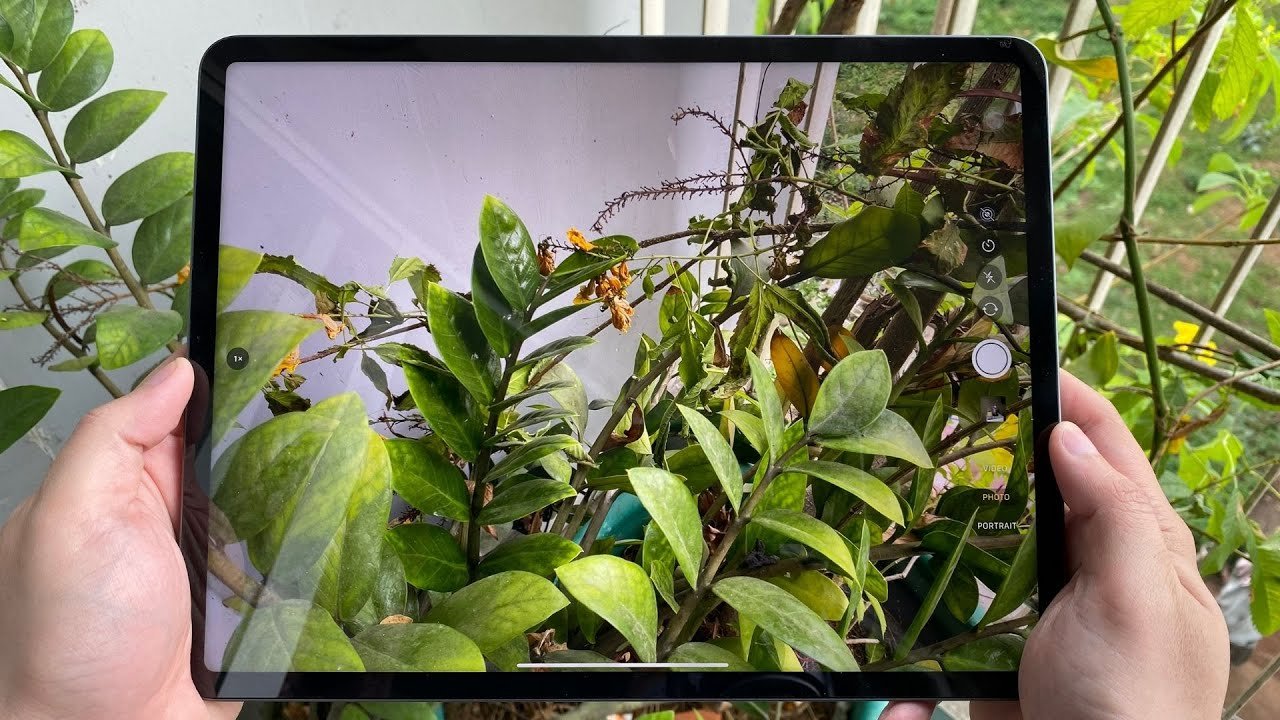
For casual outdoor photography, documenting projects, or scanning large documents like whiteboards, the iPad Air 4’s rear camera is more than sufficient. The large screen also doubles as an excellent viewfinder, making framing shots easier, though the ergonomics of holding a 10.9-inch tablet for photography remain inherently awkward compared to a smartphone.
2. Indoor and Moderate Lighting Conditions
Moving indoors, or into environments with less abundant light, presents a greater challenge for any camera, and the iPad Air 4 is no exception.
- Noise Management: As light levels drop, image noise becomes more apparent. While the camera attempts to mitigate this through noise reduction, it often results in a slight smudging of fine details and a softer overall look. This is typical for sensors of this size without dedicated low-light modes like Night Mode.
- Color Shift: Under mixed artificial lighting (e.g., warm incandescent and cool LED), the automatic white balance generally does a decent job, but some slight color shifts or a warmer/cooler cast might be observed.
- Detail Retention: Detail preservation decreases significantly in moderate lighting. While still usable for general indoor shots, intricate patterns or textures might appear less defined than in bright light.
For snapping photos of products indoors, capturing family moments in a well-lit living room, or taking notes from a projector screen, the performance is still perfectly acceptable. However, don’t expect the pristine, noise-free images you might get from a flagship smartphone in similar conditions.
3. Low Light Performance
This is undeniably the iPad Air 4’s Achilles’ heel when it comes to photography. The absence of Apple’s Night Mode – a computational photography marvel that significantly enhances low-light performance on iPhones – is keenly felt here.
- Significant Noise: In truly dim conditions, images are plagued by noticeable noise, often appearing as grainy speckles throughout the frame.
- Loss of Detail: Fine details are largely lost, appearing smeared or muddy as the camera attempts to compensate for the lack of light.
- Muted Colors: Colors become desaturated and less accurate, often taking on a washed-out appearance.
- Slow Autofocus: The autofocus system struggles to lock on in very low light, leading to missed shots or blurry images.
For practical purposes, the rear camera in low light is best reserved for quick documentation where absolute image quality is secondary, or for situations where some light source (even a small lamp) is present. It is certainly not a camera you’d reach for to capture stunning nightscapes or dimly lit interior shots.
4. Video Recording Performance
The iPad Air 4’s video capabilities are surprisingly robust for a tablet, supporting up to 4K resolution at 60 frames per second.
- 4K Quality: In good lighting, 4K footage is sharp, detailed, and exhibits good color reproduction. The high resolution is excellent for capturing lectures, presentations, or even casual vlogging, especially when paired with the iPad’s powerful editing capabilities.
- Stabilization: While it lacks optical image stabilization (OIS), the digital cinematic video stabilization works reasonably well to smooth out minor jitters and shakes, particularly at 1080p. Walking footage will still show some motion, but static handheld shots or slow pans are remarkably steady.
- Audio Quality: The built-in microphones capture clear audio, suitable for video calls or recording speech. For more professional video work, an external microphone would, of course, be necessary.
- Autofocus in Video: Continuous autofocus tracks subjects effectively during video recording, ensuring they remain sharp as they move within the frame.
The ability to shoot 4K video makes the iPad Air 4 a viable tool for quick video projects, recording tutorials, or creating short social media clips. The large screen again aids in framing and monitoring your shot, and the iPad’s processing power allows for immediate 4K editing without external hardware.
Front Camera Performance: The Communication Hub
The 7-megapixel FaceTime HD camera, while seemingly modest in resolution, is arguably the more critical camera for the average iPad user. Its primary purpose is communication and interaction.
1. Video Conferencing (FaceTime, Zoom, etc.)
- Clarity and Detail: In well-lit environments, the 7MP sensor delivers clear and sufficiently detailed video calls. Faces appear sharp, and background elements are rendered with enough clarity to provide context without being distracting.
- Color Accuracy: Skin tones are generally accurate, and colors are pleasing, which is crucial for natural-looking video conversations.
- Low Light Performance (Video Calls): While not exceptional, the front camera holds up reasonably well in moderate indoor lighting for video calls. Noise will increase, and details will soften, but it generally remains usable for communication, avoiding a completely pixelated or overly dark image. The Retina Flash (screen-based flash) can provide a soft, even light in very dim conditions, though it’s more for still selfies than continuous video.
- Field of View: The field of view is wide enough to comfortably fit one or two people in the frame, making it suitable for family calls or small group meetings.
2. Selfies
For casual selfies, the 7MP front camera is adequate. It captures enough detail for social media sharing, and the Auto HDR feature helps balance exposure in challenging lighting. However, it’s not designed for high-resolution, professional-grade selfies. The absence of a Portrait Mode (software-based background blur) is a notable omission compared to iPhones, which would enhance selfie quality.
3. The Missing "Center Stage"
One crucial point to highlight is that the iPad Air 4 does not feature Apple’s "Center Stage" technology. This feature, introduced with the iPad Pro (M1) and subsequently on the iPad mini 6 and base iPad 9th generation, uses a wider-angle front camera and machine learning to keep you automatically centered in the frame during video calls, even as you move around. Its absence on the iPad Air 4 means users will need to manually adjust their position or the iPad’s angle to stay within the frame, which can be less convenient for dynamic video calls or presentations. This is a significant distinction that impacts the overall video conferencing experience compared to newer iPad models.
Software Integration and Ecosystem Benefits
The iPad Air 4’s camera performance isn’t solely about the hardware; its integration with iPadOS and Apple’s ecosystem significantly enhances its utility.
- Camera App Simplicity: The native Camera app on iPadOS is straightforward and easy to use. It offers essential modes like Photo, Video, Slo-mo, Time-lapse, and Panorama. While it lacks the manual controls and advanced features found in third-party pro camera apps, its simplicity makes it accessible for everyone.
- Seamless Photo Editing: Once photos and videos are captured, the iPad Air 4 truly shines as a post-capture device. The large Liquid Retina display provides an excellent canvas for editing in the native Photos app, which offers powerful non-destructive editing tools. For more advanced users, apps like Adobe Lightroom Mobile, Affinity Photo, Pixelmator Photo, and LumaFusion transform the iPad into a portable content creation studio, leveraging the A14 Bionic chip’s power for quick rendering and complex edits.
- Augmented Reality (ARKit): The A14 Bionic chip, combined with the rear camera, makes the iPad Air 4 an excellent platform for AR. The camera provides the visual input, and the powerful chip processes the environment, allowing AR apps to overlay virtual objects onto the real world with impressive stability and realism. From educational apps that let you explore the human anatomy in 3D to games that turn your living room into a battlefield, the camera is fundamental to these experiences.
- Document Scanning in Notes and Files: The integrated document scanner within the Notes app (and available in the Files app) is incredibly convenient. The camera intelligently detects document edges, corrects perspective, and enhances readability, turning physical documents into clean digital PDFs. This feature alone makes the iPad Air 4’s camera invaluable for students, professionals, and anyone dealing with paperwork.
- Continuity Camera: This feature allows you to use your iPhone or iPad camera to scan documents or take photos directly into an app on your Mac. While often used with iPhones, the iPad Air 4 can also serve this purpose, offering a larger viewfinder and potentially more stable capture for certain documents.
Ergonomics and User Experience: The Tablet as a Camera
Using a 10.9-inch tablet as a camera comes with inherent ergonomic challenges.
- Awkward Handling: Holding a large, flat slab of glass and aluminum to take photos or videos is often cumbersome and less discreet than using a smartphone. It’s difficult to maintain a stable grip, especially with one hand, and the sheer size makes it less ideal for spontaneous street photography or quick candid shots.
- Viewfinder Advantage: On the flip side, the large display serves as an expansive viewfinder, making composition easier and allowing for a better preview of your shot. This is particularly beneficial for video recording, where you can clearly see the framing and any potential issues.
- Privacy Concerns: Using a tablet for photography can also feel more intrusive in public settings compared to a smartphone, drawing more attention.
Ultimately, while the iPad Air 4 can take photos and videos, it’s not designed to replace your smartphone for everyday photography. Its camera is best utilized when the larger screen and iPadOS ecosystem offer a clear advantage, such as for scanning, AR, or video calls, rather than traditional "point and shoot" scenarios.
Strengths and Weaknesses Summarized
Strengths:
- Excellent in Good Lighting: Rear camera delivers sharp, color-accurate photos and 4K video in bright conditions.
- Strong Video Conferencing: Front camera provides clear 1080p video calls, crucial for remote interactions.
- Robust Document Scanning: Integrates seamlessly with Notes and Files for efficient digitization of documents.
- Powerful AR Platform: The A14 Bionic chip combined with the camera creates immersive augmented reality experiences.
- Seamless Integration with iPadOS: Benefits from powerful on-device editing, Continuity Camera, and a simple camera interface.
- Large Viewfinder: The 10.9-inch display makes framing and reviewing shots easier.
Weaknesses:
- Poor Low Light Performance: No Night Mode; images suffer from significant noise and loss of detail in dim conditions.
- Lack of Advanced Features: Missing Ultra Wide lens, Telephoto lens, LiDAR Scanner, and ProRAW support (found on iPad Pro and newer iPhones).
- No Center Stage: The absence of this feature impacts the convenience of video calls compared to newer iPad models.
- Ergonomics for Photography: Holding a large tablet for traditional photography is awkward and less portable than a phone.
- Limited Front Camera Resolution: 7MP is adequate but not stellar for high-quality selfies or detailed video streams.
Conclusion: A Camera of Practicality, Not Prestige
The iPad Air 4’s cameras are a testament to Apple’s pragmatic approach to tablet design. They are not intended to compete with the photographic prowess of a flagship iPhone, nor do they possess the specialized capabilities of the iPad Pro’s camera system. Instead, they are finely tuned instruments designed to enhance the iPad’s core functionalities: communication, productivity, and immersive computing.
In well-lit environments, the rear camera is a surprisingly capable snapper for casual use, document capture, and even 4K video recording. Its true value, however, lies in its seamless integration with iPadOS, transforming the device into a powerful tool for scanning, augmented reality, and on-device content creation. The front-facing camera, while modest in resolution, is a reliable workhorse for video conferencing, serving as a vital link in an increasingly connected world.
For users considering the iPad Air 4, it’s crucial to set realistic expectations. If your primary need is a professional-grade camera for photography or videography, an iPhone Pro or dedicated camera system would be a far superior choice. However, if you seek a versatile tablet that can handle video calls with clarity, digitize documents effortlessly, unlock the potential of augmented reality, and capture decent quality photos and videos for quick sharing or on-device editing, then the iPad Air 4’s camera system is more than just an afterthought; it’s an integral, and often unsung, component that contributes significantly to the device’s overall value proposition. It is, in essence, a camera built for utility, not for the pursuit of photographic excellence, and in that role, it performs admirably.