
Unlocking Synergy: A Deep Dive into iPad Air 4 and Magic Keyboard Compatibility
In the ever-evolving landscape of personal computing, the lines between traditional laptops and powerful tablets have become increasingly blurred. Apple, a pioneer in both realms, has significantly contributed to this convergence, particularly with its iPad lineup. While iPads have long been lauded for their portability, intuitive touch interface, and vibrant app ecosystem, the introduction of accessories like the Magic Keyboard has transformed them into formidable productivity machines, capable of handling tasks traditionally reserved for notebooks.
Among Apple’s diverse tablet offerings, the iPad Air 4 stands out as a sweet spot – a device that marries the premium design and robust performance of the iPad Pro series with a more accessible price point. But for many, the true potential of the iPad Air 4 is only fully realized when paired with Apple’s iconic Magic Keyboard. This article will meticulously explore the compatibility between the iPad Air 4 and the Magic Keyboard, dissecting its features, benefits, drawbacks, and ultimately, whether this powerful duo lives up to its promise of delivering a laptop-like experience.
The iPad Air 4: A Pro in Disguise
Before diving into the Magic Keyboard’s synergy, it’s crucial to understand the iPad Air 4 itself. Launched in late 2020, the iPad Air 4 marked a significant design departure from its predecessors, adopting the sleek, all-screen aesthetic previously exclusive to the iPad Pro. It boasts a beautiful 10.9-inch Liquid Retina display, Touch ID integrated into the top button, and most notably for performance, the A14 Bionic chip – the same processor found in the iPhone 12 series.
Beyond its powerful internals and stunning display, the iPad Air 4 brought two critical features that cemented its compatibility with Pro-level accessories:
- USB-C Port: Replacing the Lightning port, the USB-C connector opened up a world of possibilities for external displays, storage, and a wider range of accessories.
- Smart Connector: Located on the back of the device, the Smart Connector is a magnetic interface that provides both power and data transfer to compatible accessories, eliminating the need for Bluetooth pairing or separate charging. This feature is the bedrock of its seamless integration with the Magic Keyboard.
With these advancements, the iPad Air 4 transcended its "Air" moniker, offering a compelling package for users who desired Pro features without the Pro price tag, making it an ideal candidate for a keyboard transformation.
The Magic Keyboard: Apple’s Productivity Powerhouse
The Magic Keyboard for iPad, first introduced alongside the 2020 iPad Pro models, is not just a keyboard; it’s a meticulously engineered accessory designed to fundamentally alter the iPad user experience. It differentiates itself from traditional tablet keyboards through several innovative features:
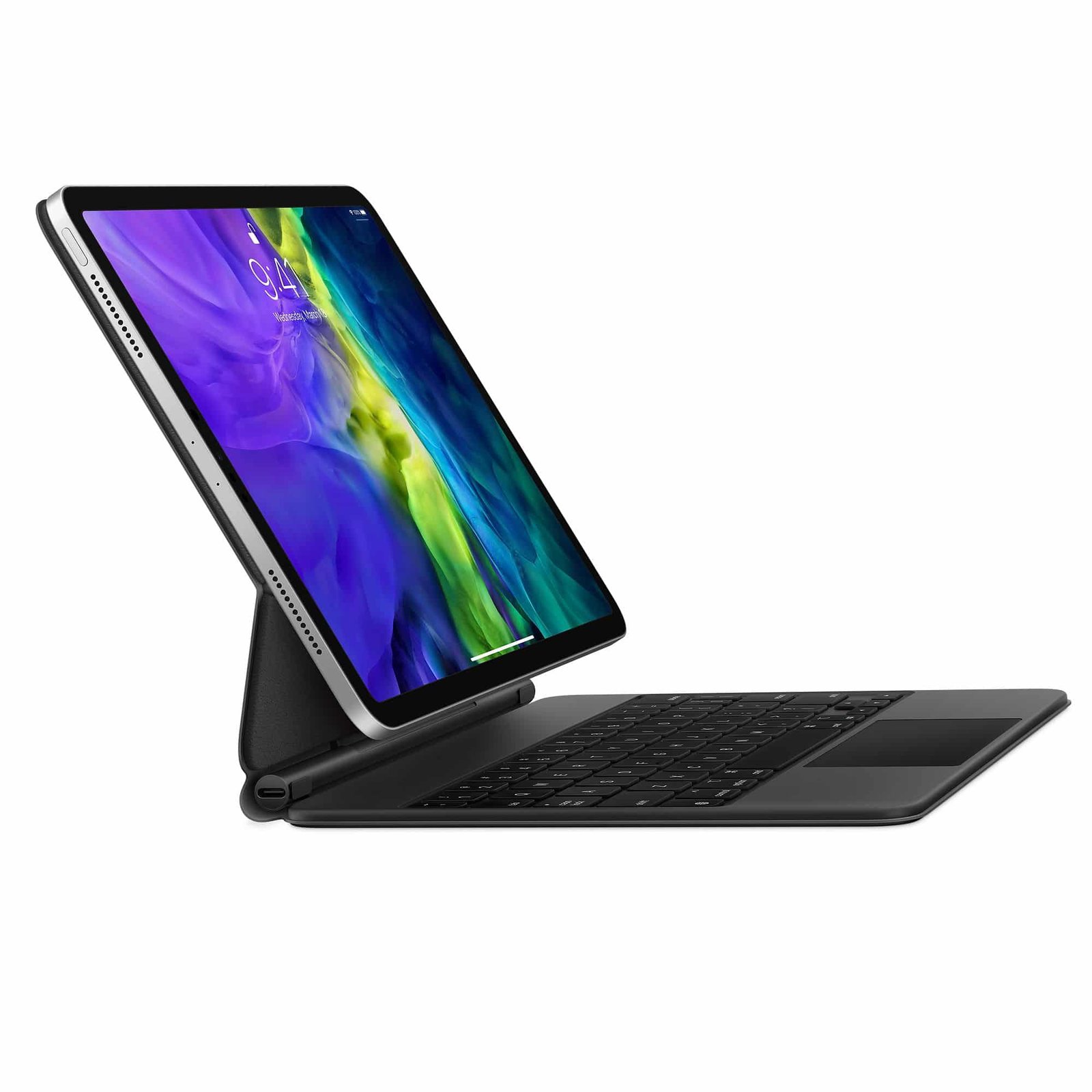
- Floating Cantilever Design: This signature design allows the iPad to magnetically attach and float above the keyboard, offering smooth angle adjustment for optimal viewing. It creates an almost sculptural aesthetic, elevating the iPad to an eye-level position.
- Backlit Scissor-Mechanism Keys: Unlike the Smart Keyboard Folio, the Magic Keyboard incorporates a full-size, backlit keyboard with 1mm of key travel, providing a tactile and comfortable typing experience akin to Apple’s MacBook keyboards.
- Integrated Trackpad: A multi-touch trackpad is built directly below the keyboard, offering precise cursor control and support for a wide array of iPadOS gestures, significantly enhancing navigation and productivity.
- USB-C Passthrough Port: Located on the hinge, this additional USB-C port allows for passthrough charging of the iPad, freeing up the iPad’s main USB-C port for connecting other accessories like external drives, monitors, or hubs.
- Smart Connector Reliance: The Magic Keyboard connects to the iPad via the Smart Connector, ensuring instant pairing, power delivery, and data transfer without the hassle of Bluetooth or batteries.
These features position the Magic Keyboard as a premium, high-performance accessory, transforming the iPad into a truly versatile computing device.
The Compatibility Explained: A Perfect Match
The short answer to the question of compatibility is a resounding yes: the iPad Air 4 is fully compatible with the Magic Keyboard. Specifically, it uses the same Magic Keyboard designed for the 11-inch iPad Pro (1st, 2nd, and 3rd generations). This compatibility is not merely coincidental but a deliberate design choice by Apple, leveraging the shared physical dimensions and, crucially, the Smart Connector.
Here’s a detailed breakdown of how this compatibility works:
-
Physical Dimensions: The iPad Air 4 shares nearly identical dimensions with the 11-inch iPad Pro. This precise sizing ensures that the iPad Air 4 fits perfectly within the Magic Keyboard’s magnetic housing, snapping into place with satisfying precision. The camera cutout on the keyboard is also designed to accommodate the iPad Air 4’s single camera module, even though it’s slightly larger to fit the iPad Pro’s dual-camera system.
-
The Smart Connector: This is the lynchpin of the integration. The three small magnetic contacts on the back of the iPad Air 4 align perfectly with the corresponding pins on the Magic Keyboard. Upon connection, the Smart Connector instantly establishes a secure, reliable link for:
- Power Delivery: The Magic Keyboard draws power directly from the iPad Air 4, eliminating the need for an internal battery in the keyboard itself. This means you never have to worry about charging the keyboard separately.
- Data Transfer: All keystrokes from the keyboard and gestures from the trackpad are transmitted instantaneously to the iPad via the Smart Connector, ensuring zero latency and a seamless, responsive experience. There’s no Bluetooth pairing process, no connection drops, and no input lag.
-
iPadOS Integration: Apple designed iPadOS from the ground up to support external keyboards and trackpads/mice. When the iPad Air 4 connects to the Magic Keyboard, iPadOS automatically recognizes it as a primary input device.
- Cursor Support: The unique, context-aware cursor in iPadOS comes alive. It adapts its shape dynamically to the element it hovers over – a text field, a button, an app icon – providing visual cues that enhance precision and intuition.
- Multi-Touch Gestures: The trackpad supports a full suite of multi-touch gestures, mirroring those found on macOS trackpads. Swiping with multiple fingers to switch between apps, pinch-to-zoom, scrolling, and accessing the Home Screen or App Switcher become fluid and efficient.
- Keyboard Shortcuts: iPadOS fully supports a wide range of keyboard shortcuts, including standard command-key combinations for copy, paste, undo, and more. Holding down the Command key reveals a comprehensive list of shortcuts available in any given app, greatly speeding up workflows.
-
USB-C Passthrough Charging: The USB-C port on the Magic Keyboard’s hinge is more than just an aesthetic detail. When a USB-C power adapter is plugged into this port, it charges the iPad Air 4 directly through the Smart Connector. This ingenious feature frees up the iPad Air 4’s primary USB-C port for other peripherals, such as external SSDs, USB-C hubs, monitors, or audio interfaces, expanding the iPad’s utility significantly.
This intricate dance of hardware and software ensures that the iPad Air 4 and Magic Keyboard function not as separate accessories, but as a cohesive, integrated computing unit.
Features and Benefits of the Combo
The union of the iPad Air 4 and Magic Keyboard unlocks a plethora of features and benefits that significantly elevate the iPad experience:
-
Superior Typing Experience: The Magic Keyboard’s backlit, scissor-mechanism keys offer a comfortable, responsive, and satisfying typing experience. The 1mm key travel provides excellent tactile feedback, making long typing sessions – whether for essays, emails, or coding – a pleasure rather than a chore. The backlighting is a crucial addition, allowing for work in low-light conditions, a feature absent on Apple’s Smart Keyboard Folio.
-
Precision Trackpad: The integrated trackpad is a game-changer for productivity. It transforms the iPad from a touch-first device into a cursor-driven machine, offering pixel-perfect selection, drag-and-drop functionality, and seamless text editing. The fluid, context-aware cursor of iPadOS, combined with the trackpad’s multi-touch gestures, provides an intuitive and efficient way to navigate the interface, switch between apps, and interact with content, bridging the gap with a traditional laptop.
-
Ergonomic Floating Design: The unique cantilever design not only looks futuristic but also serves a practical purpose. By elevating the iPad above the keyboard, it brings the screen closer to eye level, improving ergonomics and reducing neck strain during extended use. The ability to smoothly adjust the viewing angle allows users to find their optimal position, whether working at a desk, on a lap, or in a tight space.
-
Integrated USB-C Passthrough Charging: This seemingly small feature has a massive impact on workflow. By allowing the iPad to charge through the Magic Keyboard’s hinge, the iPad’s own USB-C port remains free. This is invaluable for users who frequently connect external drives, USB-C hubs, external monitors, or other peripherals, eliminating the need for constant cable swapping or relying on dongles that block the charging port.
-
Robust Protection: When closed, the Magic Keyboard acts as a sturdy folio case, providing front and back protection for the iPad Air 4. The rigid exterior safeguards the screen and aluminum chassis from scratches, bumps, and minor impacts, making the combo more durable and travel-friendly.
-
Enhanced Productivity: For tasks that involve significant text input, precise navigation, or multitasking, the Magic Keyboard dramatically boosts productivity. Writing documents, creating spreadsheets, editing presentations, managing emails, or even light coding become significantly more efficient. The combination of a physical keyboard and trackpad allows for faster data entry and more precise control than touch-only interaction.
-
Aesthetic Integration: The Magic Keyboard’s design language perfectly complements the iPad Air 4. Its minimalist, space gray or white finish, coupled with the floating design, creates a cohesive and premium look that truly makes the iPad feel like a single, unified device, rather than a tablet with an attached accessory.
Addressing the Drawbacks and Considerations
Despite its impressive features and benefits, the iPad Air 4 and Magic Keyboard combo is not without its drawbacks. These considerations are crucial for potential buyers to weigh before making a significant investment.
-
Price: The most significant hurdle is the cost. The Magic Keyboard is a premium accessory with a premium price tag, often costing more than some entry-level laptops. When combined with the iPad Air 4, the total investment can approach or even exceed the cost of a MacBook Air, making it a serious financial decision.
-
Weight and Bulk: While the iPad Air 4 is commendably light on its own, adding the Magic Keyboard significantly increases the overall weight and bulk. The keyboard itself is quite heavy due to its sturdy construction, magnets, and internal components. This transforms the lightweight, highly portable tablet into a device that feels much closer to a laptop in terms of heft, potentially negating some of the iPad’s inherent portability advantages for users who prioritize extreme lightness.
-
Battery Drain: Since the Magic Keyboard draws power directly from the iPad Air 4 via the Smart Connector, it consumes a portion of the iPad’s battery life. While the impact might not be drastic for casual use, intensive typing sessions or prolonged use with the backlight on will result in a noticeable reduction in the iPad’s overall battery longevity compared to using the iPad without the keyboard.
-
No Function Row: A common complaint among users transitioning from traditional laptops is the absence of a dedicated function row (F1-F12 keys). This means no dedicated keys for adjusting screen brightness, media controls, volume, or even an escape key (though a software escape key is often available). While iPadOS offers gestures and Control Center for these functions, the lack of physical keys can disrupt muscle memory and workflow for some users.
-
Limited Viewing Angles: While the floating cantilever design allows for smooth angle adjustment, the range of motion is not as extensive as a traditional laptop hinge or a versatile kickstand (like those found on the Logitech Combo Touch or Microsoft Surface devices). For certain use cases, such as drawing with the Apple Pencil (where the screen needs to be nearly flat) or extreme viewing angles, the Magic Keyboard’s design can be restrictive.
-
No Apple Pencil Storage: Unlike some third-party keyboard cases that offer a dedicated slot or loop for the Apple Pencil, the Magic Keyboard only allows the Pencil to magnetically attach to the side of the iPad. While this is how the Pencil charges, it’s not a secure enclosure when the case is closed or being carried, making it susceptible to being knocked off.
-
Durability and Wear: Over time, the hinge mechanism, while robust, may experience some wear and tear. The outer material, while durable, can also show signs of use, especially around the edges and corners. Given the accessory’s price, users expect long-term resilience.
-
Not a "True" Laptop Replacement: While the Magic Keyboard significantly enhances the iPad Air 4’s productivity, it’s crucial to remember that it’s still running iPadOS, not macOS or Windows. This means certain desktop-class applications, complex multitasking workflows, or specific development tools might still be limited or unavailable. While iPadOS has become incredibly capable, it’s important to manage expectations and understand its inherent differences from a full desktop operating system.
Who is this Combo For? Ideal Use Cases
Despite its drawbacks, the iPad Air 4 and Magic Keyboard combo represents a compelling proposition for a specific demographic of users:
- Students: For note-taking, writing essays, research, and general academic work, this combo is superb. The portability for carrying between classes, the excellent typing experience for lectures, and the trackpad for navigating research papers make it an ideal companion.
- Professionals on the Go: For those who primarily deal with emails, documents, presentations, and cloud-based applications, the combo offers a lightweight and highly capable mobile workstation. It’s perfect for business trips, remote work, or meetings where a full laptop might be overkill.
- Writers and Journalists: The comfortable keyboard makes long-form writing a pleasure, and the portability allows for work in diverse environments, from coffee shops to co-working spaces.
- Light Coders/Programmers: For those using iPadOS-compatible coding environments or SSH clients, the physical keyboard and trackpad significantly improve the coding experience.
- Users Seeking a Primary Device that Isn’t a Traditional Laptop: For individuals who appreciate the simplicity, touch interface, and app ecosystem of iPadOS but occasionally need a more traditional input method for productivity, this combo is an excellent bridge.
- Creatives (with a caveat): While artists and designers will still primarily use the Apple Pencil, the Magic Keyboard allows them to seamlessly switch to typing for captions, scripts, emails, or managing files, providing a balanced workflow.
Alternatives to Consider
For those intrigued by the concept but perhaps deterred by the Magic Keyboard’s price or specific limitations, there are viable alternatives:
- Apple Smart Keyboard Folio: This official Apple accessory is lighter, thinner, and significantly more affordable. However, it lacks backlighting, a trackpad, and the floating design. It’s a good option for those who only need occasional typing and prioritize extreme portability.
- Logitech Combo Touch: This is often cited as the Magic Keyboard’s strongest competitor. It offers a trackpad, a full function row, and a kickstand design that allows for more versatile viewing angles (including a drawing mode). It’s also generally more affordable and offers better protection. Its main trade-off is often a slightly less premium typing experience and a less elegant, bulkier design compared to the Magic Keyboard’s sleekness.
- Other Bluetooth Keyboards and Stands: For budget-conscious users, pairing a standalone Bluetooth keyboard and mouse with a separate iPad stand offers the most flexibility and affordability. However, this setup is less integrated and less convenient for on-the-go use.
Conclusion
The iPad Air 4 and Magic Keyboard compatibility is more than just a functional pairing; it’s a synergistic relationship that unlocks the full potential of Apple’s mid-range tablet. The Magic Keyboard transforms the iPad Air 4 from an excellent consumption and touch-first device into a formidable productivity machine, offering a premium typing experience, precise trackpad navigation, and a design that truly makes it feel like a cohesive, laptop-like unit.
Its strengths lie in its seamless integration via the Smart Connector, the tactile comfort of its backlit keys, the intuitive precision of its trackpad, and the ingenious passthrough charging port. For students, professionals, and anyone seeking a highly portable and versatile computing device that can handle serious work, this combination is incredibly compelling.
However, it is imperative to acknowledge its significant drawbacks: the steep price, the added weight and bulk, the lack of a function row, and the inherent limitations of iPadOS compared to a full desktop operating system. For some, these trade-offs might steer them towards a traditional laptop or a more budget-friendly third-party accessory.
Ultimately, the decision to invest in the Magic Keyboard for the iPad Air 4 boils down to individual needs, workflow, and budget. For those who value Apple’s design philosophy, a premium typing experience, and the unique blend of tablet versatility with laptop-like productivity, and are willing to pay the premium, the iPad Air 4 and Magic Keyboard combo delivers an unparalleled and deeply satisfying computing experience. It represents a significant step forward in Apple’s vision for the future of personal computing, where the lines between devices continue to elegantly fade.
